How to change individual ownership: Difference between revisions
Jump to navigation
Jump to search
Created page with "{{Editor location|Buildings}} {{Editor steps|title=change ownership of individual buildings|Select 3D World > Buildings > Edit Buildings|Select the building of which ownership needs to be changed from the list of buildings on the left panel, or by directly selecting the building in the 3D world|Select on the right panel, from the properties of the selected building, the desired owner from the drop down menu of field named "Owner"}}<br> <gallery> File:SelectEditConstructi..." |
(No difference)
|
Revision as of 16:04, 14 October 2022
How to change ownership of individual buildings:
- Select 3D World > Buildings > Edit Buildings
- Select the building of which ownership needs to be changed from the list of buildings on the left panel, or by directly selecting the building in the 3D world
- Select on the right panel, from the properties of the selected building, the desired owner from the drop down menu of field named "Owner"
-
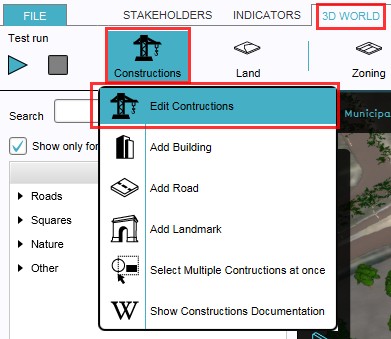 1. Select to edit buildings
 -
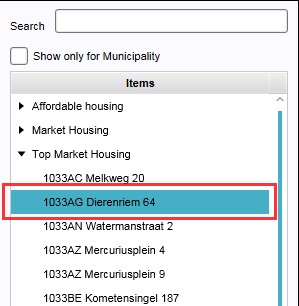 2a. Select from the list the building to be edited
 -
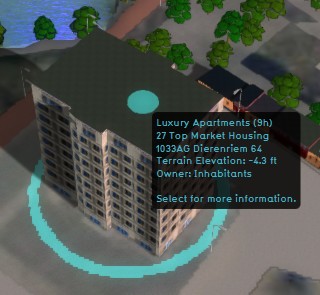 2b. ...or select directly the building to be edited in the 3D world
 -
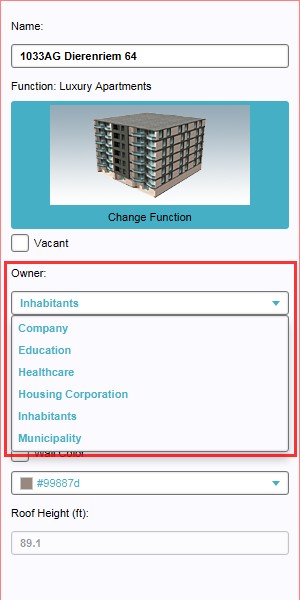 3. Select new owner from drop down menu


