Timestamp: Difference between revisions
No edit summary |
|||
| Line 188: | Line 188: | ||
|zone-offset | |zone-offset | ||
|offset-x | |offset-x | ||
|+0000; -08; -0830; -08:30; -083015; -08:30:15; | | +0000; -08; -0830; -08:30; -083015; -08:30:15; | ||
|- | |- | ||
|Z | |Z | ||
|zone-offset | |zone-offset | ||
|offset-Z | |offset-Z | ||
|+0000; -0800; -08:00; | | +0000; -0800; -08:00; | ||
|- | |- | ||
|p | |p | ||
Revision as of 07:26, 10 September 2025
A Timestamp is a way of representing a date and time. The way this date and time is formatted can vary per project, per data source and per region in the world. Therefore, the Tygron Platform provides a means to configure and manage the way dates and times are interpreted for user supplied data.
The Timestamp format used in your project can be changed in in the Project Detail panel. This format will be used to interpret timestamps present in time-values CSV data, used for example by an Inlet Q's dynamic range in the Water Overlay Wizard.

Timestamp format
This format does require a certain symbology. In short we will describe it here. More details can be found at java's DateTimeFormatter patterns.
Symbols
| Symbol | Meaning | Examples |
|---|---|---|
| y | year | 2004; 04 |
| M | month of year | 7; 07; Jul; July; J |
| d | day of month | 10; 31; 4; |
| H | hour of day (0-23) | 0; 4; 13; 23 |
| m | minute of hour | 0, 31, 47, 60 |
| s | second of minute | 55,12, 6 |
| Symbol | Meaning | Presentation | Examples |
|---|---|---|---|
| G | era | text | AD; Anno Domini; A |
| u | year | year | 2004; 04 |
| y | year-of-era | year | 2004; 04 |
| D | day-of-year | number | 189 |
| M/L | month-of-year | number/text | 7; 07; Jul; July; J |
| d | day-of-month | number | 10 |
| Q/q | quarter-of-year | number/text | 3; 03; Q3; 3rd quarter |
| Y | week-based-year | year | 1996; 96 |
| w | week-of-week-based-year | number | 27 |
| W | week-of-month | number | 4 |
| E | day-of-week | text | Tue; Tuesday; T |
| e/c | localized day-of-week | number/text | 2; 02; Tue; Tuesday; T |
| F | week-of-month | number | 3 |
| a | am-pm-of-day | text | PM |
| h | clock-hour-of-am-pm (1-12) | number | 12 |
| K | hour-of-am-pm (0-11) | number | 0 |
| k | clock-hour-of-am-pm (1-24) | number | 0 |
| H | hour-of-day (0-23) | number | 0 |
| m | minute-of-hour | number | 30 |
| s | second-of-minute | number | 55 |
| S | fraction-of-second | fraction | 978 |
| A | milli-of-day | number | 1234 |
| n | nano-of-second | number | 987654321 |
| N | nano-of-day | number | 1234000000 |
| V | time-zone ID | zone-id | America/Los_Angeles; Z; -08:30 |
| z | time-zone name | zone-name | Pacific Standard Time; PST |
| O | localized zone-offset | offset-O | GMT+8; GMT+08:00; UTC-08:00; |
| X | zone-offset 'Z' for zero | offset-X | Z; -08; -0830; -08:30; -083015; -08:30:15; |
| x | zone-offset | offset-x | +0000; -08; -0830; -08:30; -083015; -08:30:15; |
| Z | zone-offset | offset-Z | +0000; -0800; -08:00; |
| p | pad next | pad modifier | 1 |
| ' | escape for text | delimiter | |
| single quote | literal | ' | |
| [ | optional section start | ||
| ] | optional section end | ||
| # | reserved for future use | ||
| { | reserved for future use | ||
| } | reserved for future use |
Example formats
Example of Timestamp Formats are:
- yyyy-MM-dd
- MM-dd-hh-mm
- dd/MM/yy hh:mm:ss
- yyyy/MM/dd hh:mm:ss
- MM dd yyyy hh
Here the letters indicate the way the numbers are automatically interpreted by the Date parser used in the Tygron Platform. It is important that when you start importing CSV data with timestamps, you should first check what Timestamp formats are in the file and adjust the project's timestamp format to that format.
When you don't configure it correctly, you might receive errors of unrecognized timestamp formats, or worse, import the dates wrongly without any notice.
-
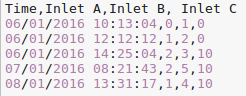 CSV for inlets with "dd/MM/yyyy HH:mm:ss" timestamp format
 -
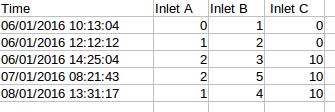 XLSX view for inlets with "dd/MM/yyyy HH:mm:ss" timestamp format


Notes
- minutes are with a small m and Months are with a capital M!
- seconds are with a small s. A large S is a fraction of second (milliseconds)!
- day of month is with a small d. A large D is a day of year!
- year should be denoted with a small y. A large Y is week-based-year, which may deviate subtly
Videos
Import and export of large CSV timestamped datasets. (In dutch)