How to import discharge areas: Difference between revisions
Jump to navigation
Jump to search
Created page with "{{Editor steps|title= |Add the Watershed Overlay and open the Configuration wizard from the right panel. |In step 2, choose the option Specified Discharge_area_(Watershe..." |
(No difference)
|
Revision as of 14:28, 25 March 2021
How to import discharge areas:
- Add the Watershed Overlay and open the Configuration wizard from the right panel.
- In step 2, choose the option Specified Discharge areas
- In step 2.1, select the first option to Import discharge areas and click on the blue Import button
- Proceed by following the steps as stated on the Geo Data Wizard page.
- In the last stap, select the attribute name that represent the Overlay key for the Dischare areas.
-
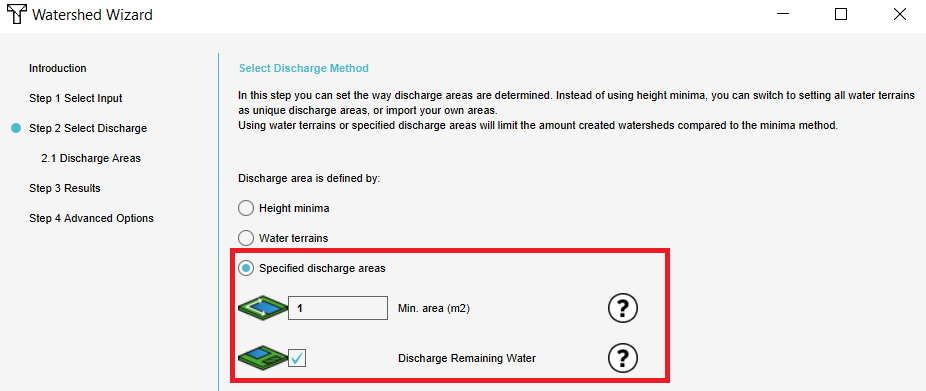 Select the third option and fill in the parameters.
 -
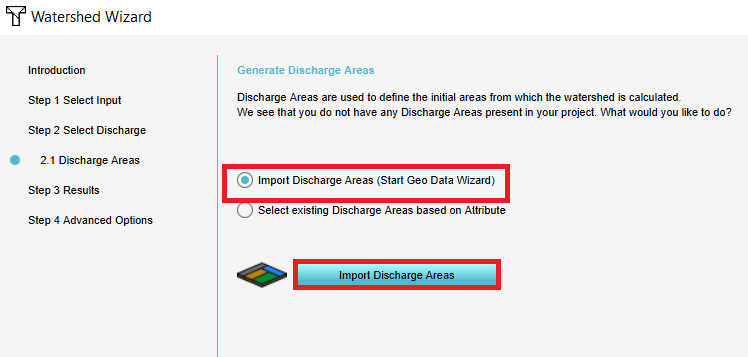 3. Select the second option and click on Import.
 -
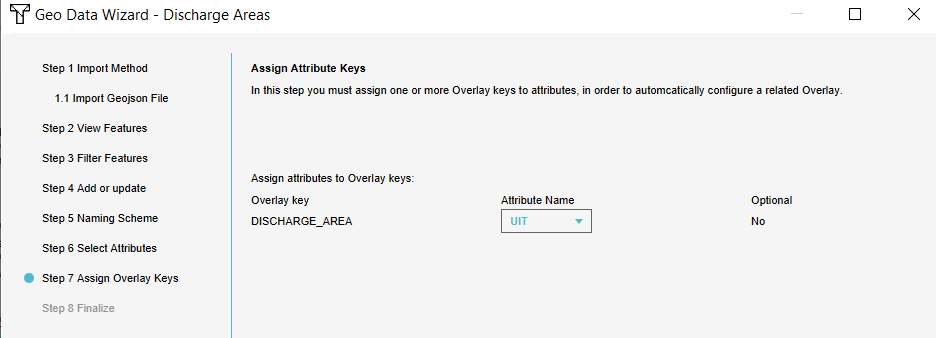 5. Connect the attribute to the Overlay key.


See also