How to use Neighborhood attributes in a Combo Overlay
Jump to navigation
Jump to search
Neighborhood attributes can be accessed directly in a Combo Overlay by configuring attribute keys. Below are steps to combine multiple attribute of a single Neighborhood to create a grid overlay showing the estimated sum of senior men and women within a neighborhood.
How to use Neighborhood attributes in a Combo Overlay:
- Select Current Situation in the ribbon bar.
- Hover over Overlays and under Grid Calculation, select Combo Overlay to add a new Combo Overlay
- In the Combo detail panel, select the tab Input
- Set the input to Attribute: Specific Layer and for layer select NEIGHBORHOOD.
- For Attribute A, select the attribute: MANNEN
- For Attribute B, select the attribute: VROUWEN
- For Attribute C, select the attribute: PERCENTAGE_PERSONEN65_JAAR_EN_OUDER
- Select the general tab.
- Click on the enlarge link next to Formula to edit the Combo Overlay's formula.
- Write the following formula
ROUND(MUL(ADD(@A, @B), DIV(@C, 100)))
- Close the formula panel
- Click on update now in the Overlay detail panel.
- Once calculated, inspect the resulting overlay.
-
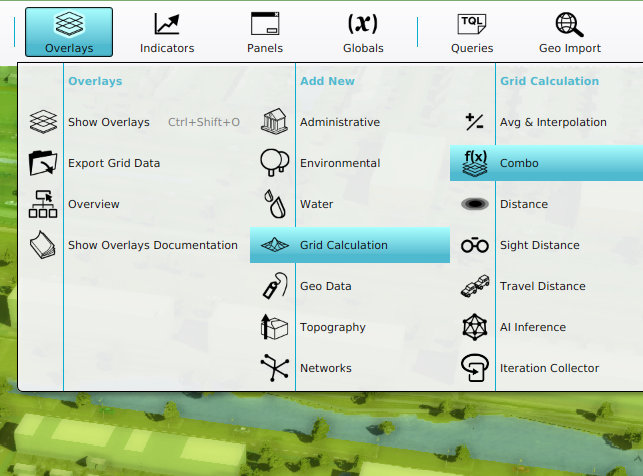 Add a new Combo Overlay.
 -
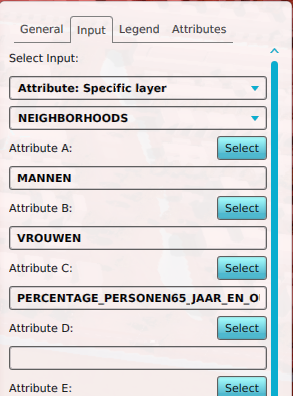 Combo overlay's input for Neighborhood attributes.
 -
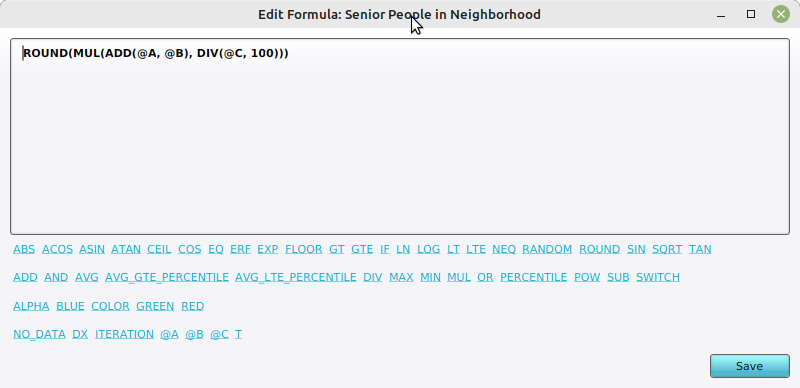 Formula that combines attributes in the formula panel.
 -
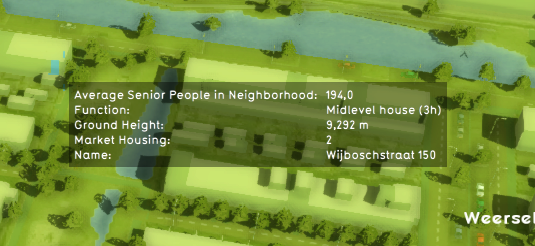 Tooltip of the Combo Overlay after calculation.


Notes
- The formula uses adds men and women and multiplies this with the percentage of persons above 65, which is divided by 100 to make it a fraction. The final result is rounded.