How to use neighborhood attributes in a Combo Overlay
Jump to navigation
Jump to search
In this howto we calculate the amount of senior man and women in a Neighborhood by adding the amount of all men and women and multiplying it with the fraction of senior persons.
How to use neighborhood attributes in a Combo Overlay:
- Select Current Situation in the ribbon bar
- Hover over Overlays and under Grid Calculation, select Combo
- In the Combo Overlay detail panel, select the Input tab.
- Select Specific Layer for Attribute.
- For Layer select Neighborhoods
- Click on the Select button next to Attribute 'A' and select an attribute, for example Mannen
- Click on the Select button next to Attribute 'B' and select an attribute, for example Vrouwen
- Click on the Select button next to Attribute 'C' and select an attribute, for example Percentage personen 65 jaar en ouder
- In the formula field, write the following formula:
ROUND(MUL(ADD,@A, @B), DIV(@C, 100)))
- Click on the Update Now link and update the combo Overlay.
-
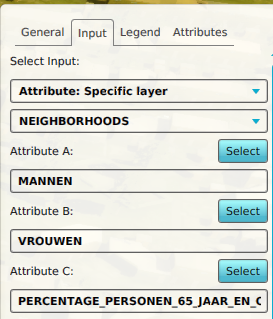 Input configured for the Combo Overlay
 -
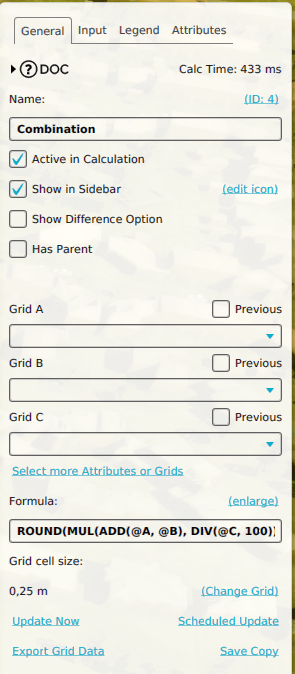 Formula configured for the Combo Overlay
 -
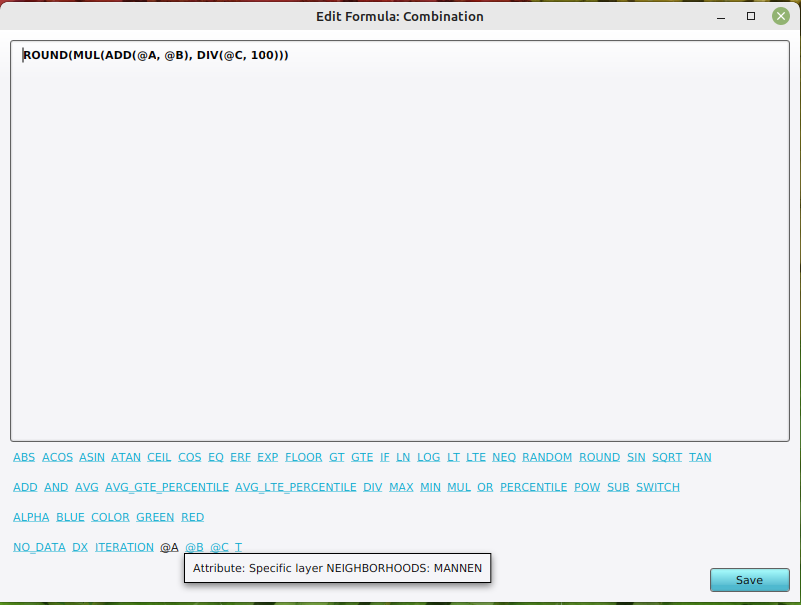 Attribute highlighted in the formula panel of the Combo Overlay


Notes
- You can edit the formula using the 'Formula Panel' by clicking on the (enlarge) link above the Formula field.