Cinematic

In the Tygron Platform, a cinematic is an automated movement of the viewport-camera through the 3D Visualization along predefined KeyPoints. While watching a cinematic, a Stakeholder is unable to take any actions. When the cinematic ends, the camera switches to the last selected camera mode, directing its view based on the last KeyPoint.
A Cinematic can display text for a Stakeholder when necessary. This can happen in two ways. The text can be displayed as a subtitle, while the camera continues to move in the cinematic. Alternatively, displaying the text can pause the cinematic, until the user confirms they wish to continue.
-
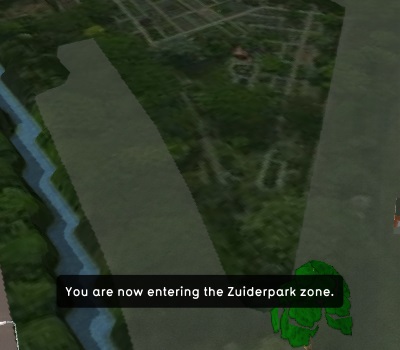 Text without pausing the cinematic
 -
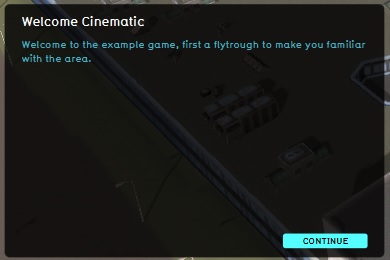 Text during a pause in the cinematic


When to use cinematics
Cinematics are generally used for exposition to the user. When it is necessary to provide information to a user, or to direct their attention to a specific predefined location in the 3D Visualization, this can be done using a cinematic. Because a cinematic takes away the user's ability to move the camera themselves, and to take actions, a cinematic is best used for vital information which only has to be provided once. An example of this is an introduction to the area at the start of a Planning Session.
By default, a welcome cinematic is present in each project, automatically generated when the project is created. This cinematic is displayed to all stakeholders at the start of the planning session, and is a brief introduction of the zones present in the 3D Visualization.
Creating and editing cinematics
In the editor, it is possible to create, duplicate, edit and delete cinematics in a project. It is also possible to create keypoints, or remove keypoints from a cinematic. In the following how to's these functions are explained.
How-to's
- How to create a Cinematic
- How to create or remove Cinematics
- How to edit Cinematics
- How to edit Keypoints
- How to edit the Camera Position
- How to couple Cinematics to Stakeholders
- How to create an HD Movie or Video Recording from the cinematic
See also
 Tools
Tools